LessTools
LESSCMSVisual page editor with a headless API LESSCOMMERCEStore, PIM and orders in one place LESSSEOGoogle visibility, measured daily — coming soon
One account and one invoice for all of them. Discover LessTools →

A lightweight CMS for companies and agencies · hosted in the EU

Editors change the site.
Not developers.

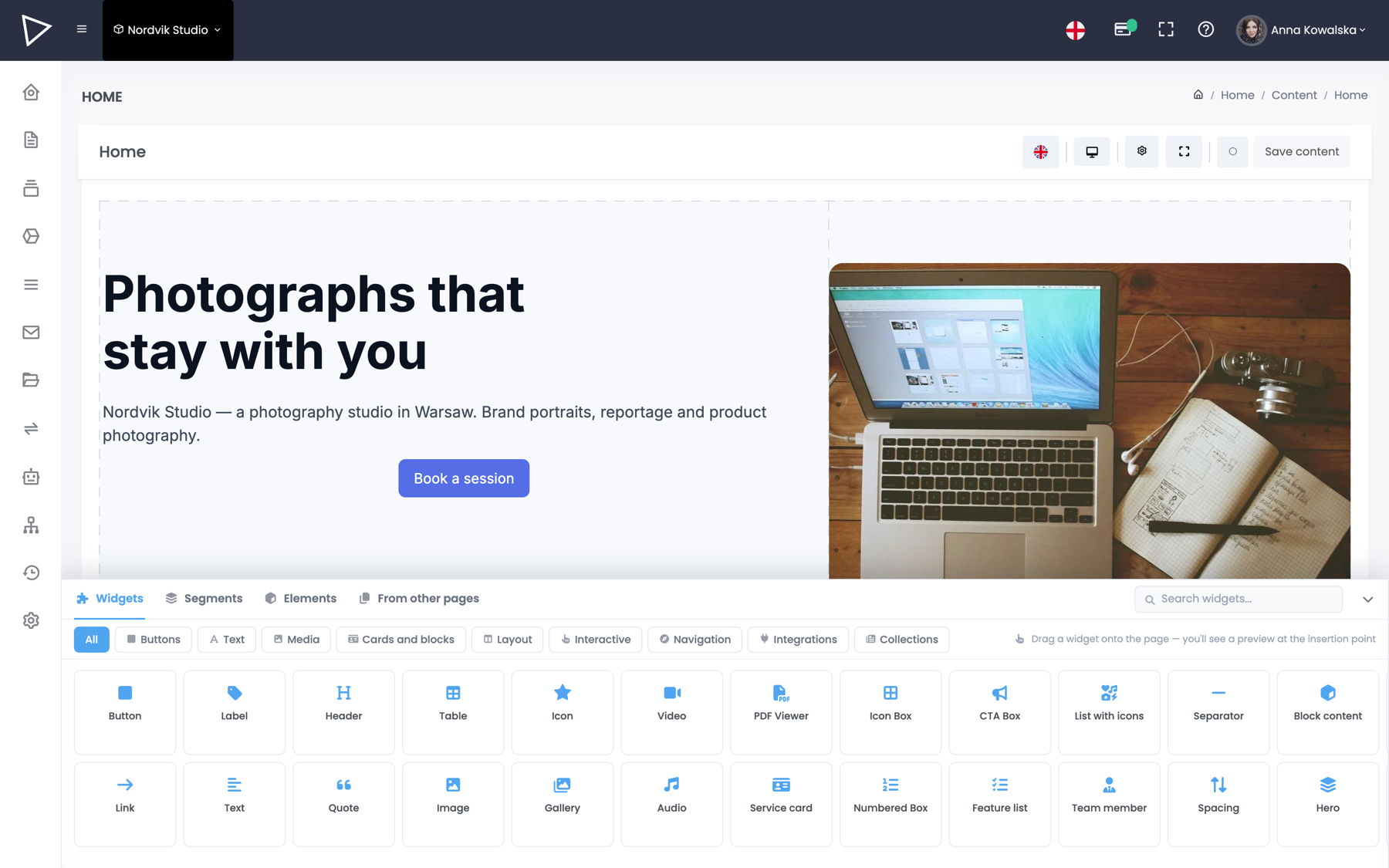
Two modes, one system. Assemble the whole site from ready-made sections and widgets, or take just the content through the API and build the front end your way. The choice is yours.

AI boosted — writes, translates, fills in meta
Real people · support without bots SEO as standard Your own domain
The LessTools family — one account, one invoice: LESSCMS LESSCOMMERCE LESSSEO COMING SOON
Two ways to use it

A content source, or the whole website.

One system, one account. The difference is who draws the front end.

Mode 1 · headless

Content only. The front end stays yours.

  • Public read API, secured with a key
  • Cache tags for purging the CDN
  • Your own content structure
# fetch collection entries curl -H "X-API-Key: $KEY" \ https://api.lesscms.io/v1/{project}/collections/projects # response { "data": [ { "slug": "brand-shoot-law-firm", "name": "Brand shoot — law firm", "client": "Nordvik", "date": "2026-05-12", "gallery": [ "…/01.jpg", "…/02.jpg" ] }, … ], "meta": { "total": 42, "lang": "en" } }
For teams with their own front end
Quick start
Mode 2 · full website

The whole site, on your domain.

  • Your own domain and SSL
  • Server-side rendering — full HTML for crawlers
  • Sitemap, robots and redirects handled for you
The page editor in the LessCMS panel
For companies and agencies without their own front end
Create a free account
Start with a ready-made site and add your own front end later — same API, same content.
Your content structure

Blog, portfolio, services — define it once, then just fill it in

You decide what a single entry is made of. The listing and the subpages build themselves.

One entry consists of:
text Title
rich text Article
select Author
date Published on
What you get:

A paginated list of entries, a separate address for every article and an entry in the sitemap. You add a new piece by filling in a form.

One project consists of:
text Name
images Gallery
select Client
date Completed on
What you get:

A portfolio filtered by client and a separate page for each project, gallery included. Add 42 entries and you have 42 finished subpages.

One service consists of:
text Service name
rich text Description
number Price from
icon Symbol
What you get:

A grid of services on the homepage and a subpage for each one — a separate address for every phrase your customers type into Google.

One person consists of:
text Full name
text Job title
image Portrait
select Department
What you get:

A team section on your about page, split by department. A new hire means one form, not a call to the agency.

Assemble it from what you need:
text rich text number date select images file relation toggle price

More than a dozen field types. Add as many as you need and name them your way.

In practice:

A restaurant menu, a machine catalogue with specifications, a training calendar, job openings, a list of branches on a map, a Q&A base — whatever repeats in your business.

Start from a ready-made template or define your own entry type and get a form, a listing and subpages for it — exactly as with the blog.

AI boosted

The assistant writes the first draft. You decide what stays.

Three places where AI saves the most time — and none of them start on their own.

Translates the site

Select the widgets, pick the target languages and run it. Several languages at once, with the formatting preserved.

Writes the first draft

Describe what the section is about and the assistant proposes the copy. The blank page stops being the most expensive hour of the project.

Fills in SEO meta

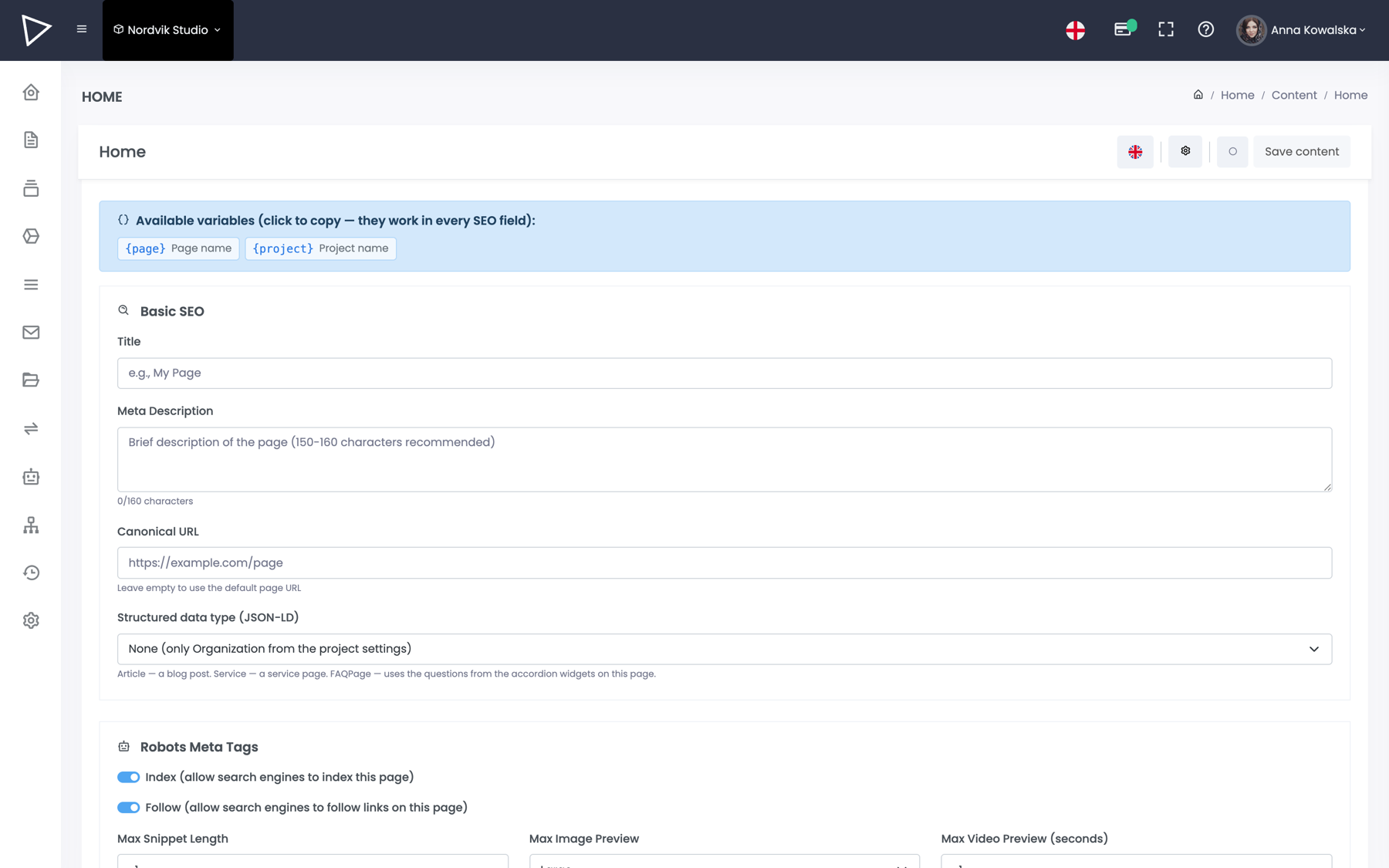
It reads the content and proposes a title and description within the limits Google likes. Separately for each language.

AI content generation in the LessCMS panel
SEO and performance

We render the site — you set the meta and the redirects

Meta and addresses are set next to the content, not in a plugin. The sitemap and robots generate themselves, and we serve the finished page from a cache at the edge of the network — with no server on your side.

SSR, not an empty div

The crawler gets full HTML with the content, not a skeleton to be rendered in the browser.

Sitemap and robots

Generated automatically from whatever is published. You add 301 redirects from the panel.

Images and cache

Automatic size and format variants, with the CDN cache purged selectively after publishing.

Library

78 widgets as standard. No plugin marketplace.

Headings, galleries, forms, accordions, timelines, maps, counters and collection grids. And when you add a store — cart, checkout and a product configurator.

HeroHeadingGallery FormAccordionTabs TimelineCounterPrice list Google MapGoogle ReviewsCollection grid CarouselBreadcrumbsCookie consent CartCheckoutProduct configurator + see them all →
Pricing

From $9 a month, with no setup fee

Five plans — from a one-person business to an agency running dozens of projects.

Questions

Before you create an account

Can I move my site off WordPress?

Yes. The content moves into collections and pages, and you keep the old addresses through 301 redirects added in the panel — so you do not lose your position in Google.

Is the data mine, and can I export it?

Yes. You can pull the content at any time through the public API — the same one that feeds your own front end. There is no format only we can read.

Do I need a developer to start?

No. You create the project yourself, assemble the page from widgets and connect the domain in the settings. A developer only becomes useful once you want your own front end on the API.

What about hosting and the domain?

Hosting is included — our renderer serves the pages from a CDN cache. You connect your own domain and the SSL certificate is issued automatically.

What does support look like?

Handled by people, not bots. On top of that there is a user guide and API documentation, both public and available without logging in.

Is there a data processing agreement (GDPR)?

Yes — the document is part of the terms of service. The servers are located in the European Union.

Create a project and see how fast the first page goes up

No card, no onboarding project, no sales call to begin with. And if you would rather talk first — leave your details and we will get in touch.